Write, run and understand SQL on SQL Server, PostgreSQL, MySQL, MariaDB, Oracle and SQLite from one fast desktop editor. Smart autocomplete, readable results, safe script running, and an optional AI Assistant that works through your own Claude Code.
Most days you do not need a heavy IDE: you need to connect, write some SQL, run just the right statement, look at the result and export it. Ez Sql Plus is built around that loop, for every engine, with the same keys and the same screens.
It knows your database: autocomplete uses the real tables and columns, hover and go-to-definition work inside your script, and long scripts stay fast. Changes you run are never a surprise: the script is split per engine and each run mode says exactly what it will execute.
Saved connections per project, color-coded by environment: SQL Server, PostgreSQL, MySQL, MariaDB, Oracle and SQLite.
Tables, columns, snippets and keywords ranked by relevance, with a help card for every keyword and built-in function: what it does and when it appeared.
Current statement, selection, up to or from the cursor, or the whole script. See the estimated plan before you run.
Semantic highlighting, hover cards, go to definition, bookmarks, find and replace, and editor themes that follow your skin.
Result tabs, sorting and filtering, export to Excel or CSV, and INSERT / UPDATE scripts generated from a grid.
Ask, explain, fix or rewrite SQL with your own Claude Code. You approve every change, and an activity log shows what it did.
A snippet manager with a fill-in wizard, starter snippets per engine, and one-key formatting that never changes what your code means.
Remappable keys, per-monitor high-DPI, your tabs and notes restored next time, and an optional encrypted local result history.
Every picture below is a real screenshot or recording of Ez Sql Plus on a sample database. Click any image to see it full-size.
Updates are included for a year with every license. These are the areas we are working toward, with no promised order or date.
SQL Server (including Express and LocalDB), PostgreSQL, MySQL, MariaDB, Oracle and SQLite.
No. The AI Assistant is optional and off by default. It uses the Claude Code you install and sign in to yourself. Claude Code is a product of Anthropic; Ez Sql Plus is not affiliated with Anthropic.
Ez Sql Plus never sends the contents of your databases, scripts or results to us. If you use the AI Assistant, what it shares is shown in its "What is shared" note, and table rows are not shared unless you allow it for a connection.
Every download is free for 30 days with everything unlocked. After that, a license is 20 USD, one time: up to 5 of your computers and a year of updates. When the trial ends without a license, the program stops until one is activated.
Windows 10 (version 21H2 or later) or Windows 11, 64-bit. It also requires .NET Framework 4.8.1, which is included in Windows 11 22H2 and later; on other versions, the installer checks for it and tells you before installing anything, and you install it from Microsoft first. Claude Code is needed only for the optional AI Assistant.
Yes. The trial starts the first time you run it.
The installer is not code-signed yet, so Windows SmartScreen may show a warning. Check the SHA-256 shown next to the download against the file you got.
Verify your download against the checksum below before you run the installer.
Version 1.1.0 · Windows 10/11 (64-bit)
Windows may warn you about this installer the first time.
EF341906CCB3E91276EA38BCFEA94ACE7025CF7A07898EF9A619530C3F57FE20
Windows may show a security warning the first time you run this installer. That is expected: Cid to Claude is new, and its installer is not yet signed with a certificate Windows recognizes, so Windows lists the publisher as unknown. Future versions will be signed.
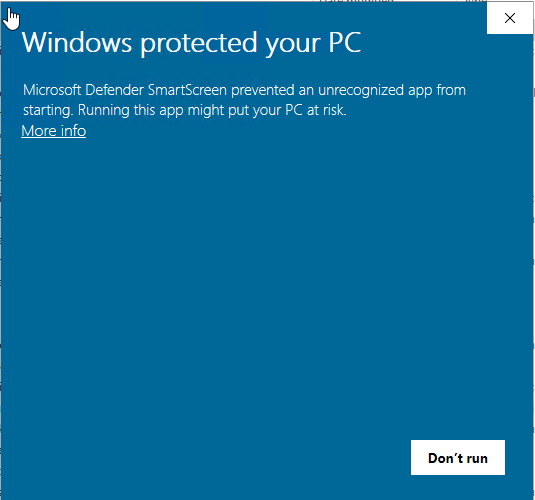
On the blue “Windows protected your PC” screen, click the More info link. Until you do, Don’t run is the only button.
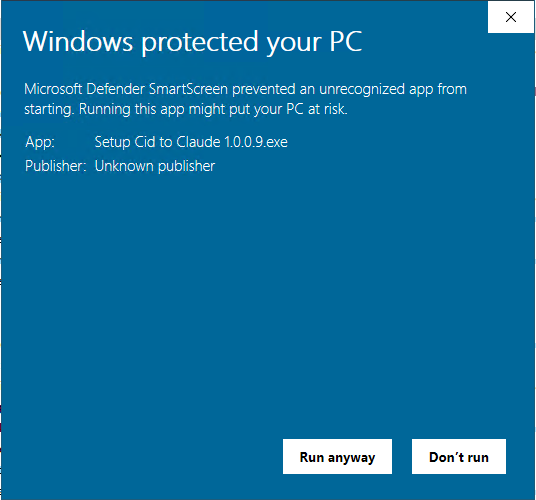
The installer’s name appears with “Unknown publisher”. Click Run anyway.
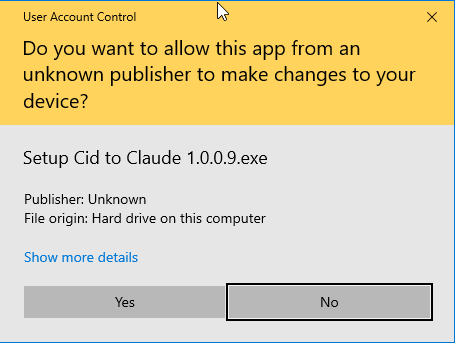
Windows asks for permission to install. Click Yes.